Emerald Coast Drone Pros and Destin Drone Solutions
Drone mapping & 3D models

For landowners, property managers & project teams

Drone mapping, 3D models & stockpile volumes

Get an overhead map, a 3D model or a stockpile volume estimate for your site. Emerald Coast Drone Pros provides drone mapping in Panama City Beach and across the Emerald Coast. We help property owners and project teams choose the coverage and files they need to review site layout, visible conditions and material quantities.

Based in Panama City Beach · Bay, Walton, Okaloosa & Gulf counties

Explore the coverage ↓

Overview

Choose the output for the decision in front of you

Aerial photos are useful for showing individual views. Drone mapping brings overlapping photographs together so you can follow roads, buildings, open areas and work zones across the property. It gives people who have never visited the site a common reference and helps everyone locate the area being discussed.

Start with the question, not the file type. Do you need to show where work is happening, explain the shape of a site, or estimate the volume of material in a pile? Those call for different outputs. The options below show where each service fits, so you can request the useful one without buying a technical package you do not need.

Different outputs, different jobs

Which mapping product do you need?

Compare the purpose and planning needs of common drone mapping outputs.
OutputThe question it helps addressWhat to agree before capture
OrthomosaicWhere are visible features across the site?Coverage, capture date, desired detail and georeferencing requirements.
3D site modelHow do visible surfaces and structures relate?Useful viewpoints, reconstruction coverage and the way the model will be reviewed.
Point cloudWhich 3D representation does the receiving team need?Requested export, coordinates and units where established, and software compatibility.
Volume analysisWhat is included in this selected material or surface quantity?Region, base/reference surface, units, exclusions and the required validation basis.

Technical work led by Cole Thurmon, VP of Operations. Explore his background and approach alongside these project examples.

One overhead view of the property

An orthomosaic combines many photographs into a continuous overhead image. It is useful when an older online map no longer reflects the site, or when separate photos make a large property difficult to follow. A current map can show new access routes, cleared areas, building locations and other visible changes.

Owners and project teams can use that view in site discussions, progress updates and property planning. If you have a drawing you want to compare with the imagery, share it before the visit so we can discuss an appropriate reference overlay.

Explore orthomosaic mapping

Mapping projects

Site maps, 3D models and material quantities.

See how related views of the same project show its layout, surface shape and selected materials.

Site mapping

Subdivision mapping & 3D site modeling

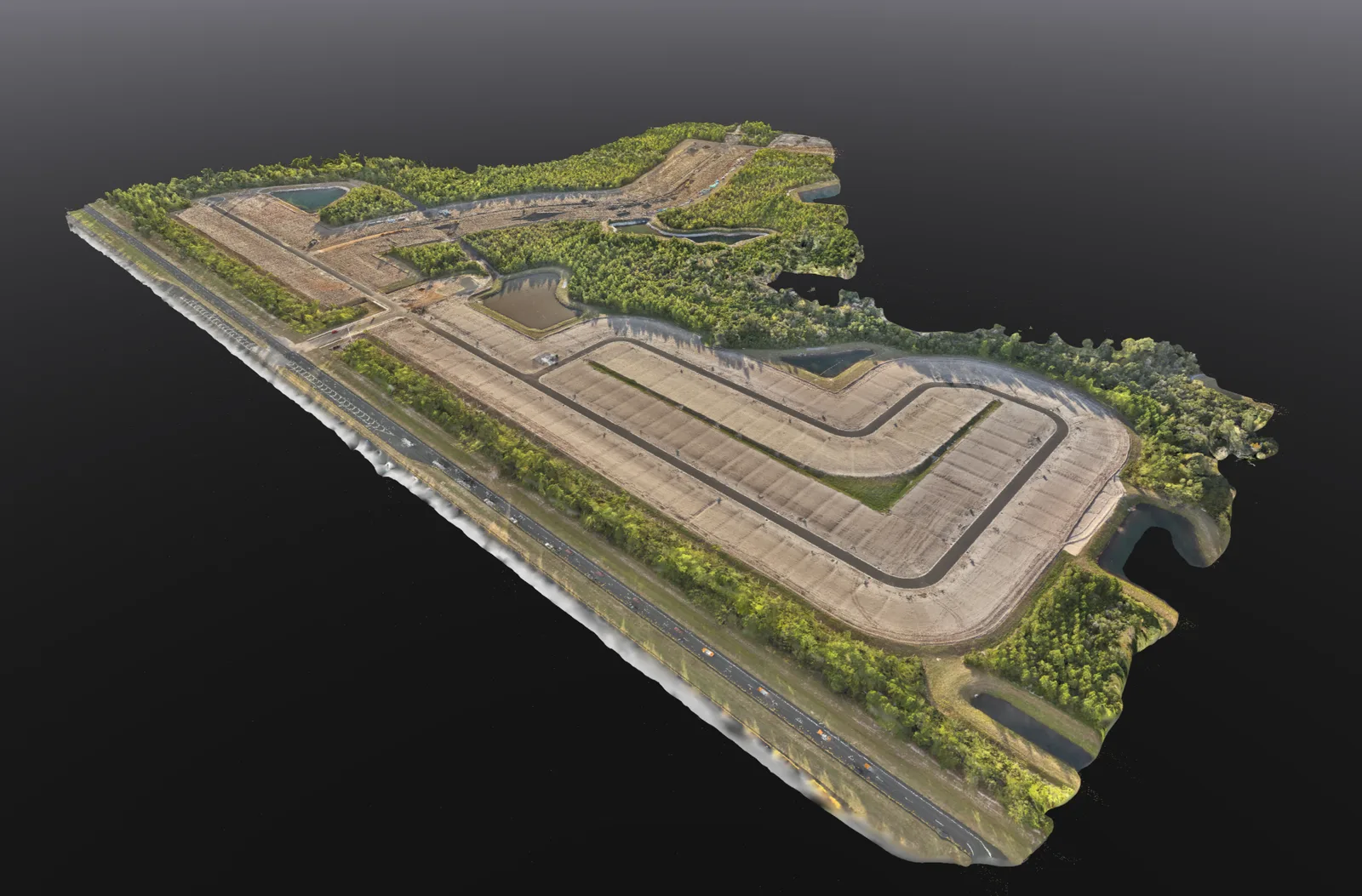
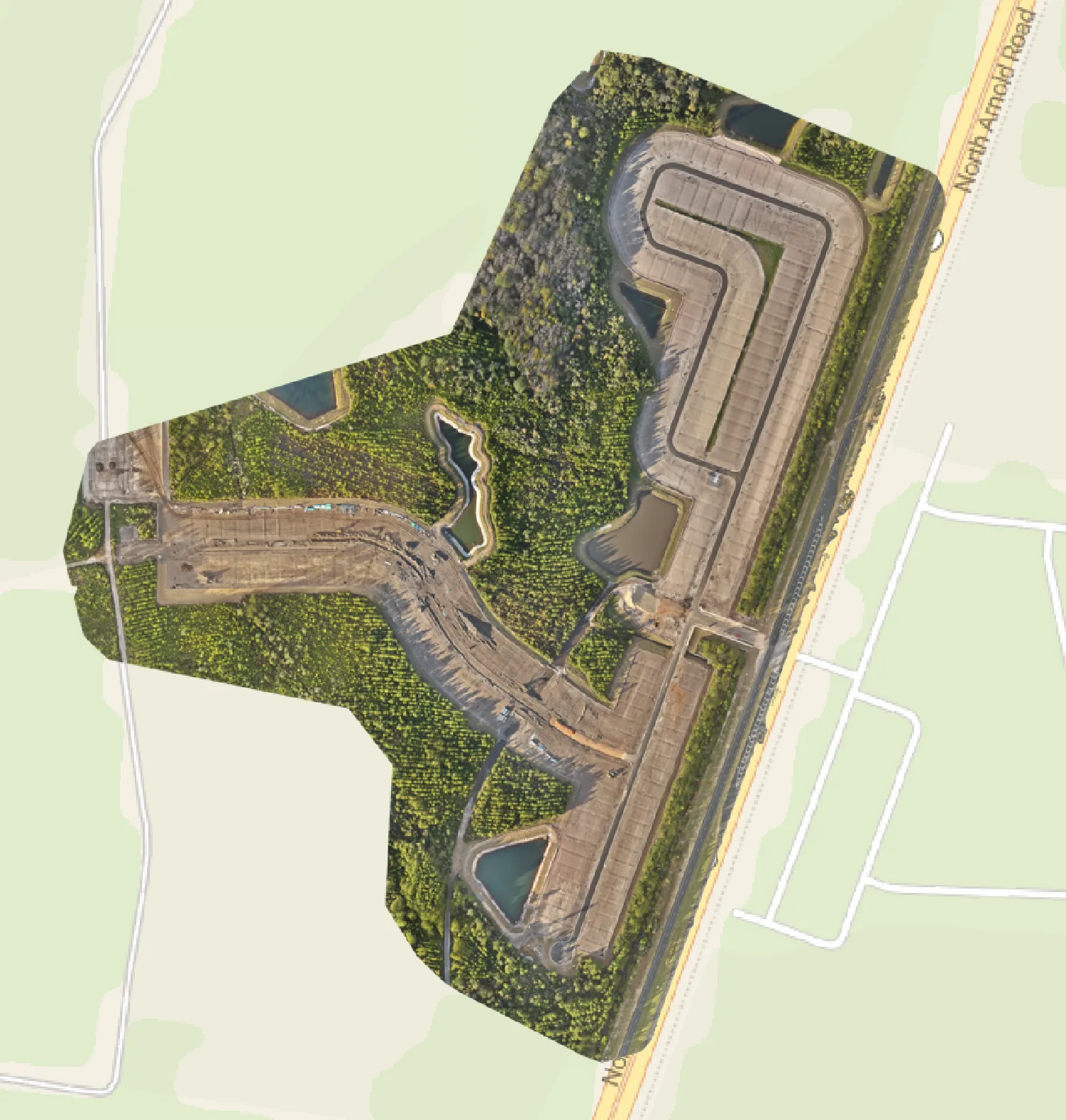
A whole-site map explains the layout. An oblique model adds the shape of roads, graded areas and drainage features. These related views make it easier to discuss the same site from two useful perspectives.
3D site model

Reconstructed roads, visible earthworks and drainage features in an oblique view.

Overhead map

A mapped overview places the captured site within its surrounding road network.

What this helps you doGive owners and project teams a shared view of roads, visible grading and the layout of a developing site.

Technical context

The model helps communicate visible surface form; the map helps people find the same area. Neither screenshot establishes a surveyed boundary or independently checked elevation.
Materials & quantities

Stockpile mapping & volume analysis

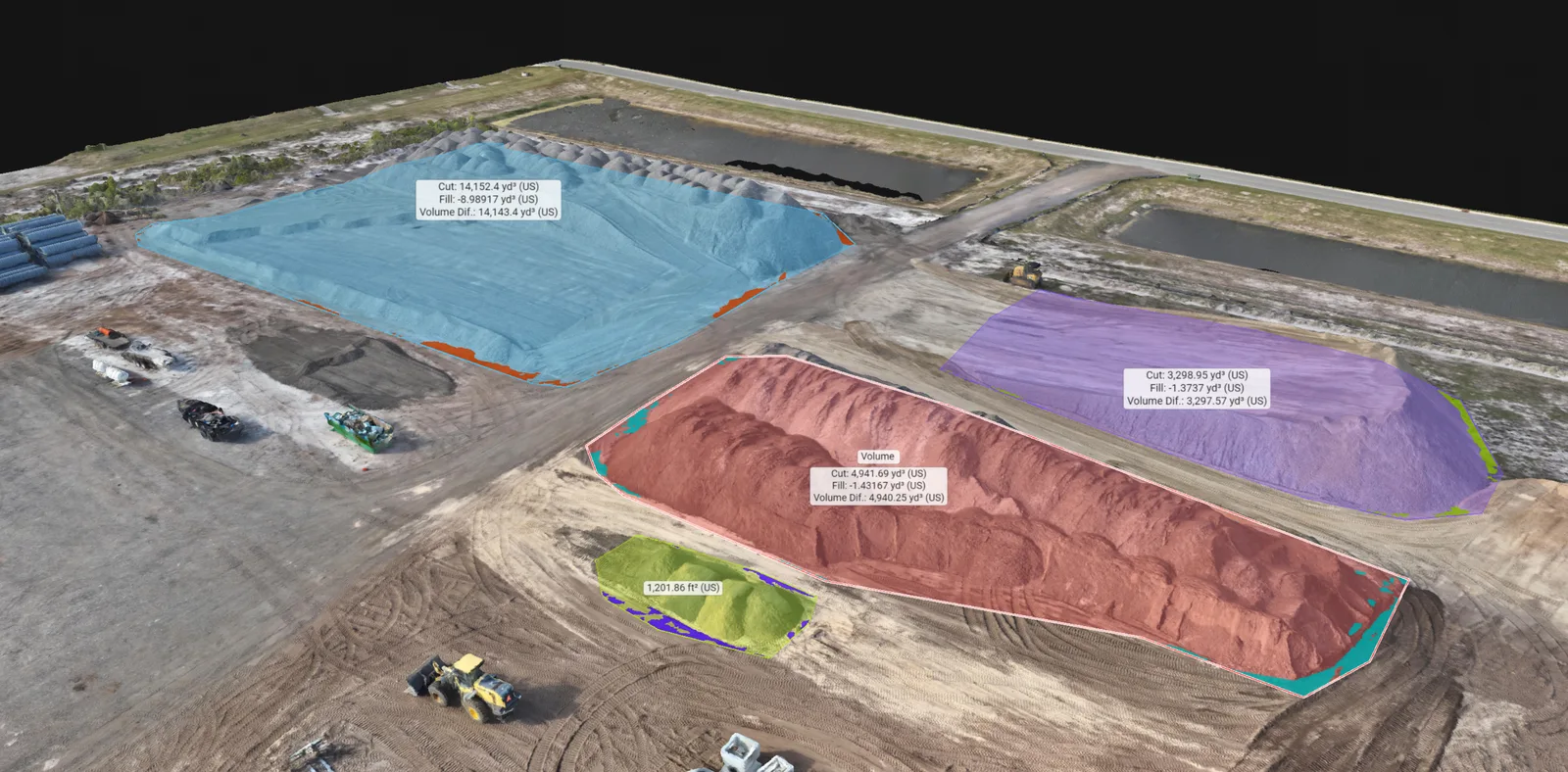
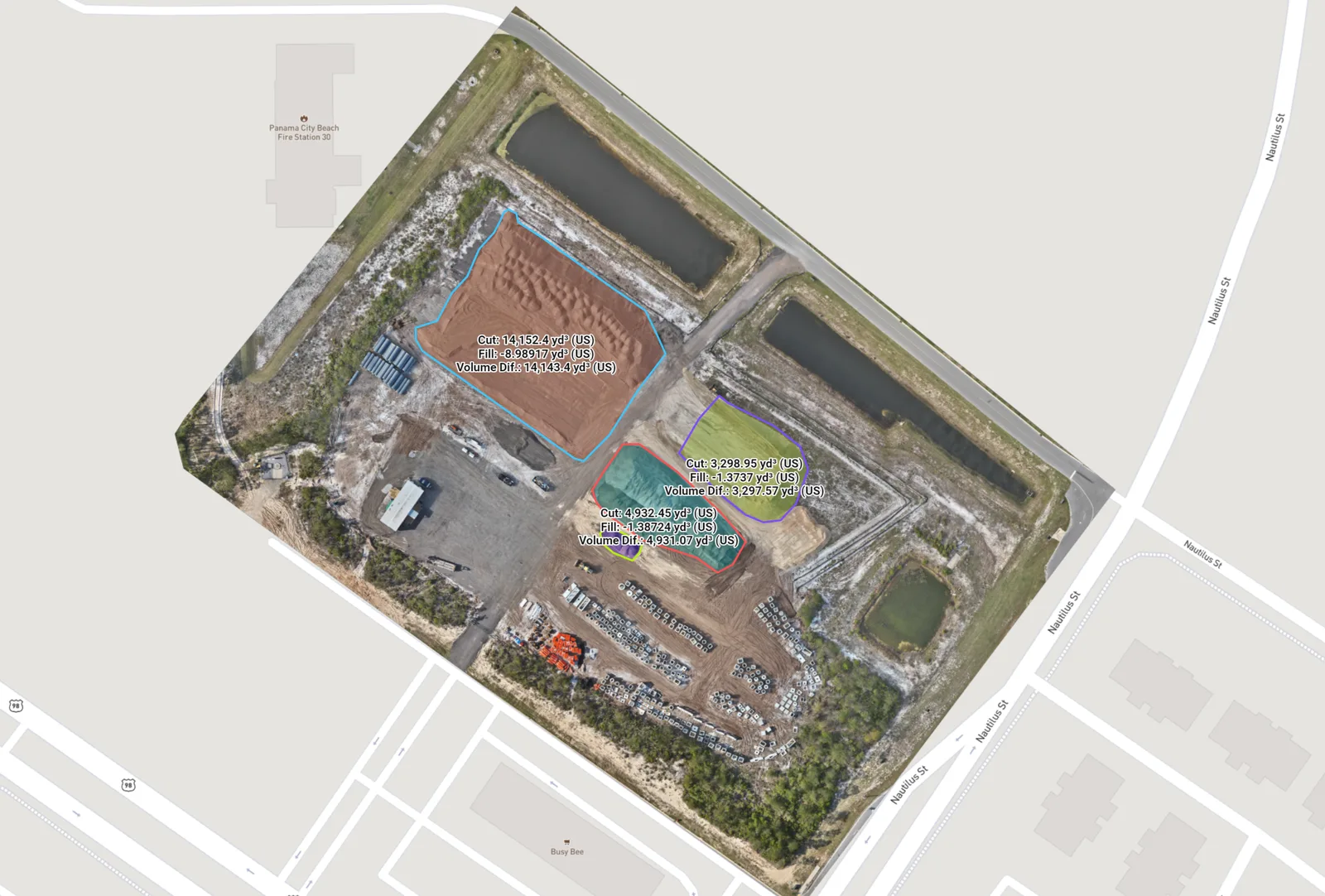
A quantity discussion needs more than a number. The selected pile, its surrounding ground and the reference surface all matter. The paired views show outlined materials within a wider working yard.

Volume regions

Colored regions and displayed volume labels identify selected stockpile areas in the model.

Mapped yard overview

The related overhead view helps locate the piles, access routes and surrounding site features.

What this helps you doLocate the selected piles, see which material regions were measured and discuss quantities with the yard in view.

Technical context

Keep the pile identifier, selected boundary, units and base method with the calculation. Repeat measurements need a consistent basis so a change in the calculation setup is not confused with a change in material.

Need a similar view of your site? Send the location and what you need to understand.

Discuss mapping for your site

See the site from more than one angle

A textured 3D site model helps explain slopes, building form and the relationship between structures and surrounding ground. It is particularly useful when an overhead view leaves someone asking how the site looks from the side.

These models are made through photogrammetry, which reconstructs visible surfaces from overlapping images. We can discuss a model for visual review or a point-cloud handoff for a team with specific file requirements. The model and the files should fit the way you plan to use them.

Explore 3D site models and point clouds

Put stockpile quantities in context

Drone volumetrics uses a reconstructed surface and a defined base to calculate the space occupied by a selected pile. For earthwork, the question may involve comparing two dated surfaces or an existing surface with a supplied reference.

Alongside the quantity, the selected area, units and calculation basis help your team understand what was included. Send any earlier surface records or project requirements so we can review whether the available information supports the comparison you need.

Explore stockpile volumes and earthwork

Useful files start with a clear brief

Start with the site location, approximate coverage area and the features that matter most. A marked-up aerial image is a helpful way to show the requested coverage. If another person will work with the data, include their software and file requirements rather than waiting until the finished map reaches their desk.

We plan the capture and processing around that brief, then review the result for coverage, gaps and visible problems. Your quote will identify the output and delivery arrangement. Where coordinate reference information or other technical inputs are needed, we discuss those before capture.

An attractive model is only the beginning of a useful technical discussion. Tell us who will receive the data, which file or viewing requirements they have, and whether the purpose is visual coordination or a measurement-dependent task. Capture date, extent, units, coordinate information where established, and known limitations are part of agreeing the right scope. These requirements should be clear before the flight rather than discovered when someone tries to use the output.

Keep a record as the site changes

A new map at a later project stage can help explain changes in access, site layout and visible work areas. Planning the same coverage from the start makes those visits more useful to compare. For regular photographs and project updates, construction progress coverage can be arranged alongside mapping.

Based in Panama City Beach, we serve Bay, Walton, Okaloosa and Gulf counties. Send the site location and any important project dates so we can review the coverage and scheduling with you.

Construction progress photography View our service areas

Good to know

Drone mapping and reality capture questions

How do I know whether I need a map or a 3D model?

Choose an overhead map when the main question is where things are. A 3D model is helpful when shape, height relationships or different viewing angles matter. Tell us what you need to explain and we will help you choose.

Is drone mapping a replacement for a survey?

No. Our image-based mapping does not establish legal property boundaries or provide licensed surveying or engineering services. If your project depends on specific measurements or elevations, share the requirements before booking so the necessary professional work and checks can be identified.

Will mapping show the ground beneath trees?

Only where the camera has a suitable view. Tree cover, roofs and other obstructions can hide surfaces. We review the location and the features you need to see before planning capture.

Can I order photographs as well as a map?

Yes. Tell us which closer views or overall site photographs would be useful. We can include the agreed mapping and photography in the project quote.

Request this service

Tell us what you need to understand

Send the location, approximate area and intended use. We will help you choose a map, model or volume workflow and explain what the quote includes.

Request a quote

Drone Mapping & 3D Models on Florida’s Emerald Coast.
Based in Panama City Beach, serving Bay County · Walton County · Okaloosa County · Gulf County. Farther trips by request.

Explore service areas

Privacy settings

Choose which external features may load. You can browse services and send a request with a typed address using essential features alone.

Essential site featuresSite security, request delivery and your privacy preference. No advertising or analytics tracker.
Always on

Turning off content already loaded reloads this page to close its connection. Copy any unfinished request details before saving that change.

Your choice is stored on this browser for up to 180 days. Cookie details · Privacy notice